Introduction
Digital marketing has changed a lot in three years. UK businesses now face stricter privacy rules. Apple launched App Tracking Transparency (ATT). This changed how iOS tracking works. Third-party cookies are going away. Chrome is removing them. Firefox already did.
These changes created a big measurement gap.
Meta and Google used to work separately. They were walled gardens. Advertisers had to compare data manually. They copied numbers from one platform and pasted them into spreadsheets. The Meta GA4 integration changed this. It changed how we track ads and optimize campaigns.
Good ad tracking now means more than just scripts and pixels. You need a strong data pipeline. GA4 shows you what users do on your site. What they click. Where they go. How long they stay. Meta Ads uses machine learning to optimize. Together, they show the full customer journey.
Many marketers have tracking problems. Meta might show 50 conversions. GA4 only shows 20. Which is right? Why the gap? This guide explains why and shows you how to set up GA4 Meta integration properly.
What Is Meta GA4 Integration?
How Does Meta Integration with GA4 Work?
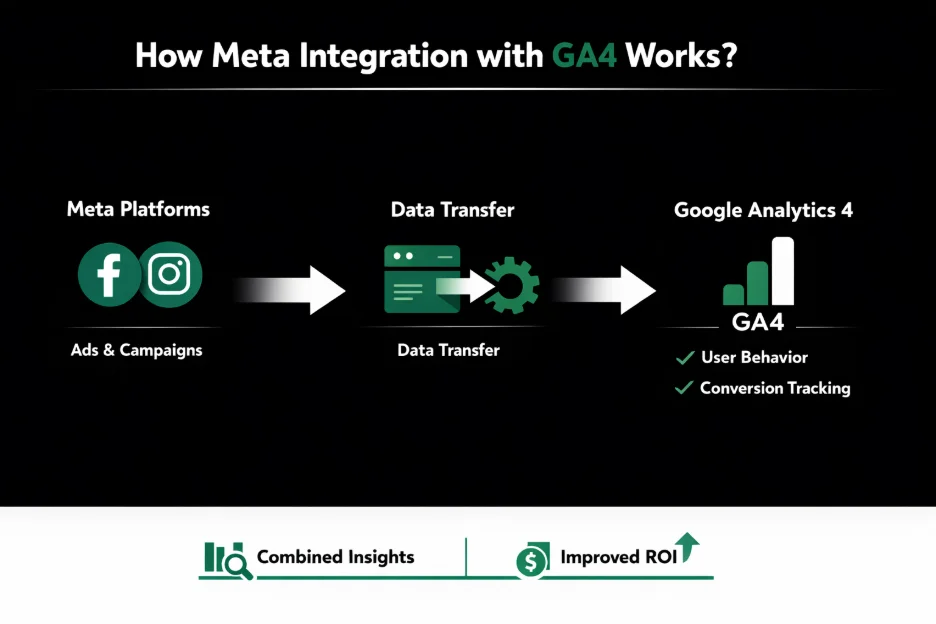
Meta integration with GA4 connects two platforms. It links Meta’s Events Manager with Google Analytics 4. This is not simple pixel tracking. It is a data bridge.
Meta can access your GA4 event data. This adds to your Meta Pixel signals. It adds to your Conversions API (CAPI) data. Meta can “see” what users do on your site. GA4 records every click, purchase, and form fill.
This is more than reporting. It is optimization. GA4 data helps Meta Ads learn better. The platform finds users who will buy. This works even when browsers block the Meta Pixel.
This beats UTM tracking. UTM codes show where traffic comes from. But they do not improve ad delivery. They do not help Meta’s algorithm learn. The integration does both.
Why Should You Integrate Meta Ads with GA4?
You need this integration if you use social ads. The main benefit is complete cross-channel measurement.
Customers do not follow straight paths. A user finds your brand on Instagram. They like a post. They search Google. They read reviews. They compare prices. They buy after seeing a Facebook retargeting ad.
Without ga4 meta ads integration, these points stay separate. You lose data. You cannot see the full picture.
The integration also improves campaigns. Meta’s algorithm gets GA4 data. It learns about what users do after clicking. Say GA4 shows users spending five minutes on a product page. Meta finds more users like them.
You get better audience insights. Better attribution. Better understanding of your customer journey. UK businesses can spend budgets smarter with strategic paid advertising.
What Are the Benefits of GA4 Meta Ads Integration?
A good GA4 integration setup with Meta helps a lot. The biggest help is stronger data signals for Meta’s algorithms.
AI-driven ads need quality data. This includes Meta’s Advantage+ campaigns. These run on machine learning. GA4 event data feeds Meta. The algorithm sees what success looks like. It sees what converting users do.
Second, you get better retargeting. You do not rely only on Pixel events. Browsers block these more now. Safari blocks them. Firefox blocks them. You use first-party data from GA4 instead. You create precise audiences that match real behavior.
You also measure conversions better. You see the customer journey clearly. You see how Meta affects GA4 “key events.” You move past last-click attribution. You understand the true value of your Meta ads.
How Do Meta and GA4 Work Together?
How Does Meta Track Ads Data?
Meta uses two tracking methods. The Meta Pixel and the Conversions API (CAPI). They work together.
The Pixel is JavaScript code. It tracks browser actions. It sees page views, button clicks, and purchases. But browsers like Safari block scripts now. The Pixel works less well than before.
The Conversions API fixes this. CAPI is server-to-server. Event data goes from your server to Meta. It skips the browser. No browser interference. No ad blocker problems.
Meta Ads Manager combines both signals. It links conversions to specific campaigns and ads. The Meta GA4 integration adds a third data source. It makes your data richer.
How Does GA4 Track Website Behavior?
GA4 uses an event-based model. Everything is an event. This differs from old Universal Analytics.
In GA4, every interaction is an event. Page views are events. Button clicks are events. Purchases are events. Each event carries details that describe the action.
GA4 uses “key events” to measure success. These used to be called conversions. The platform uses smart attribution. It looks at all touchpoints. It assigns credit fairly.
For ads conversion tracking setup, we make sure GA4 finds Meta traffic correctly. It uses UTM parameters. Then it shares success signals with Meta’s Events Manager.
What Data Gets Shared Between Meta and GA4?
The integration shares three things. Website events. Conversion signals. User behavior data.
When you link GA4 with Meta, you let Meta import “key events.” You define these in GA4.
For e-commerce, this includes view item. When users view products. It includes add to cart. When they add items. It includes purchases. When they buy.
For B2B in the UK, this includes generate lead. Form submissions. It includes file download. PDF downloads.
The integration also shares event parameters. Transaction value. Currency. Items purchased. Product details.
This shared data creates a complete picture. Both platforms use it. Meta refines targeting. The connection keeps analytics vs ad platform data gaps small.
What Are the Limitations of Meta GA4 Integration?
Meta integration with GA4 is strong but not perfect. There are limits.
First, data sharing is strict. You can only share consented data. Data users agreed to via your UK cookie banner. If they opt out, do not share their data. This creates data gaps.
Second, event mapping has limits. You cannot import every GA4 event automatically. You map them manually to Meta events. Non-standard naming causes errors.
Third, reporting has limits. Shared data helps Meta optimize. But it does not “fix” GA4 reports. GA4 uses its own attribution logic.
How Do You Set Up Meta GA4 Integration?
What Do You Need Before Integration?
Check your technical setup first. This is where professional digital marketing services help most.
You need Admin access to Meta Business Manager. You need Editor or Admin access to GA4. You must have a working Meta Pixel. You need an active Conversions API.
Your Google Tag Manager (GTM) should fire GA4 events consistently. You need a clear UTM tracking structure.
Step 1: Open Meta Events Manager
Start in Meta Events Manager. Log in. Go to “Data Sources” on the left. You will see your Pixels and Datasets.
Find “Partner Integrations.” This shows third-party platforms. Scroll or search for “Google Analytics.” Click it. The setup wizard starts.
Step 2: Connect Your GA4 Property
After selecting Google Analytics, authorize Meta. Use the account with permissions for the GA4 property.
After authorizing, a dropdown appears. It lists all GA4 properties. Select the right property. Select the data stream. This is usually your website’s web stream.
Step 3: Link GA4 with the Meta Pixel
After selecting the GA4 property, link it to a Meta Pixel or Dataset. This step tells Meta where to store GA4 data.
Linking lets Meta deduplicate events. Say both Pixel and GA4 report the same purchase. Meta sees them as one event. No inflated numbers.
Set data access permissions. Allow full event sharing.
Step 4: Choose Traffic Sharing Preferences
Meta offers two sharing modes. Share all traffic data. Or share only Meta ad traffic.
For most UK businesses, share all traffic data. It gives a bigger dataset. This helps Meta’s AI learn what converting users look like. This improves “seed” data for Lookalike Audiences.
Step 5: Map GA4 Events to Meta Conversion Events
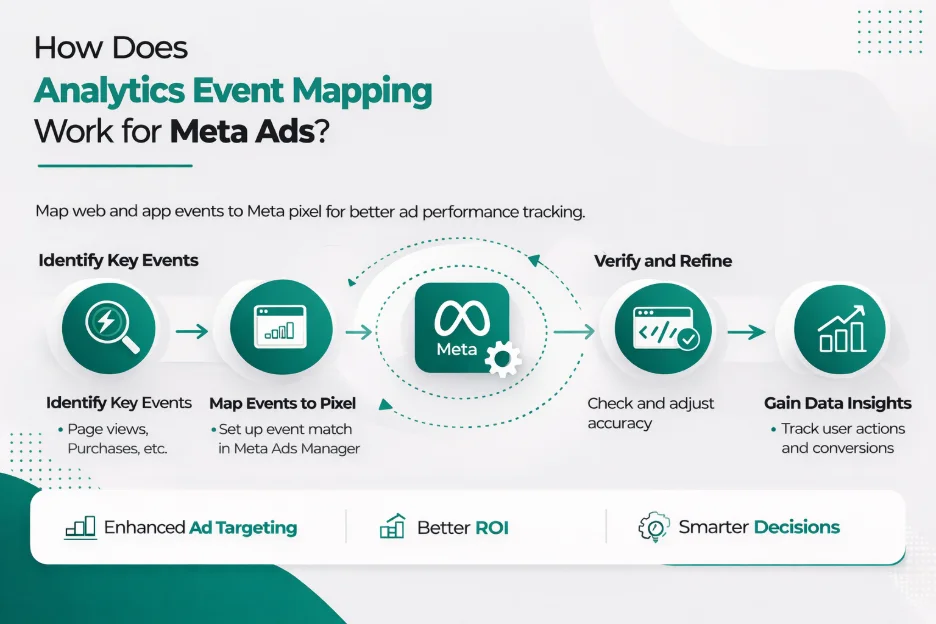
This is the technical core of GA4 integration setup with Meta. You see your GA4 events on one side. Meta’s standard events on the other. You pair them manually.
The GA4 event “purchase” maps to Meta “Purchase.” The event “generate lead” maps to “Lead.” The event “view item” maps to “View Content.”
Custom GA4 events need mapping too. Map them to the closest standard event.
Step 6: Submit and Validate the Integration
After mapping events, click submit. It does not go live right away. Meta validates it. This takes 2 to 7 days.
Meta’s systems watch the data flow. They check if mapped GA4 events match patterns. After validation, you see “Connection Quality” in Events Manager. “High” or “Great” means it works.
How Does Analytics Event Mapping Work for Meta Ads?
What Is Event Mapping?
Analytics event mapping translates GA4 to Meta. GA4 allows custom event names. Meta needs a translator.
Say you have a GA4 event called “button click contact.” Meta does not know what it means. Is it a lead? Sign-up? Just navigation? Mapping explains this.
Good event setup matters. It decides if campaigns find buyers or just clickers.
Which GA4 Events Should You Map for Meta Ads?
Most businesses need a core set. These provide 90% of value for Meta Ads.
The “purchase” event is most critical. It lets you calculate ROAS. Return on Ad Spend.
After that, “add to cart” and “begin checkout” matter. They build abandoned cart funnels.
For lead businesses, “generate lead” and “sign up” are key. Map these consistently. Meta’s “Conversion” campaigns get the data they need.
What Micro-Conversions Should You Track?
Track more than just purchases or leads. Micro-conversions show the journey.
Track product views. Track specific button clicks. Track scroll depth. Say when someone reaches 75% of a sales page. Track form starts.
These show high-intent users who are not ready yet. Micro-conversions build “mid-funnel” audiences. You nurture prospects. You send specific messages based on how far they got.
What Are the Best Practices for Analytics Event Mapping?
Follow strict practices for healthy GA4 Meta integration.
Use consistent event names. Use them across GTM, GA4, and Meta. Always use GA4’s “recommended events.” Use purchase or login. Do not create custom ones. Recommended events handle parameters better.
Avoid duplicate events. Do not have a plugin and GTM script both sending the same event. Your data gets wrong.
Always validate events. Use GA4 Debug View. Use Meta’s Test Events tool. Do this before calling setup complete.
How Do You Set Up Ads Conversion Tracking?
How Do You Set Up Conversion Tracking for Meta Ads?
Full ads conversion tracking setup needs layers. Start with the Meta Pixel. But in the UK now, the Pixel is just baseline. You must set up Conversions API (CAPI) too.
You might use Shopify Meta app. Or GTM. Or custom API. CAPI is essential. It bypasses browser limits.
The last layer is verification. Make sure events fire with right parameters. Value, currency, and content type.
How Do You Verify Conversion Tracking?
Verification never stops. It is not one-time.
Use Meta Events Manager “Test Events.” See real-time triggers. Use GA4 Debug View at the same time. Make sure Google records your website events. Check all parameters.
For technical audits, use Google Tag Assistant. Use Meta Pixel Helper. These browser extensions show if tags fail. Or if they miss critical data like Event ID.
Why Does Server-Side Tracking Matter?
Why Is Server-Side Tracking Important?
The UK moves toward a cookieless future fast. Browser-based tracking gets less reliable daily.
Ad blockers block tracking. They block pixels. They block scripts. Brave browser has built-in blocking. Apple’s Intelligent Tracking Prevention (ITP) strips cookies. Safari does this on all Apple devices.
Server-side tracking setup fixes this. You move tracking from user devices to your server. This might be Google Cloud or AWS.
You control your data fully. Privacy browsers cannot “see” data going to Meta or Google. They cannot block it.
This cuts data loss dramatically. You capture more conversions. More accurate data. Better optimization.
How Does Server-Side Tracking Architecture Work?
Typical server-side Google Tag Manager (sGTM) needs two containers. A web container and a server container.
The web container sends one data stream to your server. The server container processes it. It sends data to GA4 and Meta via CAPI.
This is more robust. It improves website speed too. Fewer third-party scripts run in browsers. It is the gold standard for Meta GA4 integration in 2026.
How Does Server-Side Tracking Improve Meta GA4 Integration?
Server-side tracking multiplies your ga4 meta ads integration power. It gives higher data accuracy.
Server-to-server communication does not face browser crashes. It does not face script blocking. This means better attribution. You identify returning users reliably.
It gives better optimization signals to Meta. When the algorithm gets complete conversion pictures, it optimizes bidding better. This often lowers Cost Per Acquisition (CPA) for your paid advertising campaigns.
How Do You Set Up GA4 First-Party Data?
What Does First-Party Data Mean in Analytics?
In ga4 first party data setup, first-party data is info customers give you directly. Their email address. Phone number. Physical address.
Third-party identifiers are disappearing. This data is the best way to match website visitors to Meta users. First-party data enables “Advanced Matching.” This increases conversions Meta can attribute to ads.
How Does GA4 Collect First-Party Data?
GA4 collects first-party data through event parameters. Through user properties.
When a user fills a form or buys, configure GTM. It captures their hashed email. It sends it to GA4 as a parameter.
Note “hashed.” To comply with UK privacy laws, never send sensitive data in plain text.
GA4 uses these identifiers. It builds detailed user profiles across devices. This shares with Meta through integration. This sharpens targeting.
How Can You Use First-Party Data to Improve Meta Ads Targeting?
First-party data signals create better Meta audiences. Much better than Pixel cookies alone.
This means better retargeting. You can target users who bought in the last 30 days. High confidence. Even if they cleared browser cookies.
This “identity-based” tracking is modern, privacy-safe advertising.
What Are the Consent Mode and Cookie Compliance Requirements in the UK?
Why Does Consent Management Matter?
For UK businesses, meta ga4 cookie compliance UK is strict law. Under GDPR and UK Data Protection Act, you must get explicit consent. Clear consent. Before dropping non-essential cookies. Before tracking users.
Failing this brings big fines. Very big fines. From the Information Commissioner’s Office (ICO). The UK regulator. They enforce privacy laws. Fines can reach millions of pounds.
Consent management ensures GA4 and Meta tags only fire when users permit. Via a cookie banner. A clear prompt. Users must opt in actively. Not pre-ticked boxes. Not assumed consent.
What Are the Consent Mode Requirements for GA4?
Google’s Consent Mode is a framework. GA4 adjusts based on user consent.
If a user denies advertising cookie consent, GA4 will not read or write those cookies. Instead, it uses “behavioral modeling.” It fills data gaps with machine learning.
For UK businesses, Consent Mode V2 is now mandatory. This keeps Google’s advertising features working. Including data sharing with Meta.
How Does Cookie Consent Work for Meta Pixel and Analytics?
Your ads analytics integration must synchronize with your Consent Management Platform (CMP).
If a user clicks “Reject All” on your banner, both Meta Pixel and GA4 tags stay dormant.
With Meta GA4 integration, ensure data sharing honors consent signals. Your privacy policy must state data is shared between these entities. Users must have opt-out rights.
How Can UK Businesses Achieve Meta GA4 Cookie Compliance?
For compliant data collection, UK businesses need “privacy-safe tracking architecture.”
Use server-side GTM. Strip out unnecessary PII. Ensure all Meta data is hashed. Combine a clear cookie banner with Consent Mode.
You build Meta GA4 integration that respects privacy. It still provides needed ad data. This balance matters for long-term UK market success.
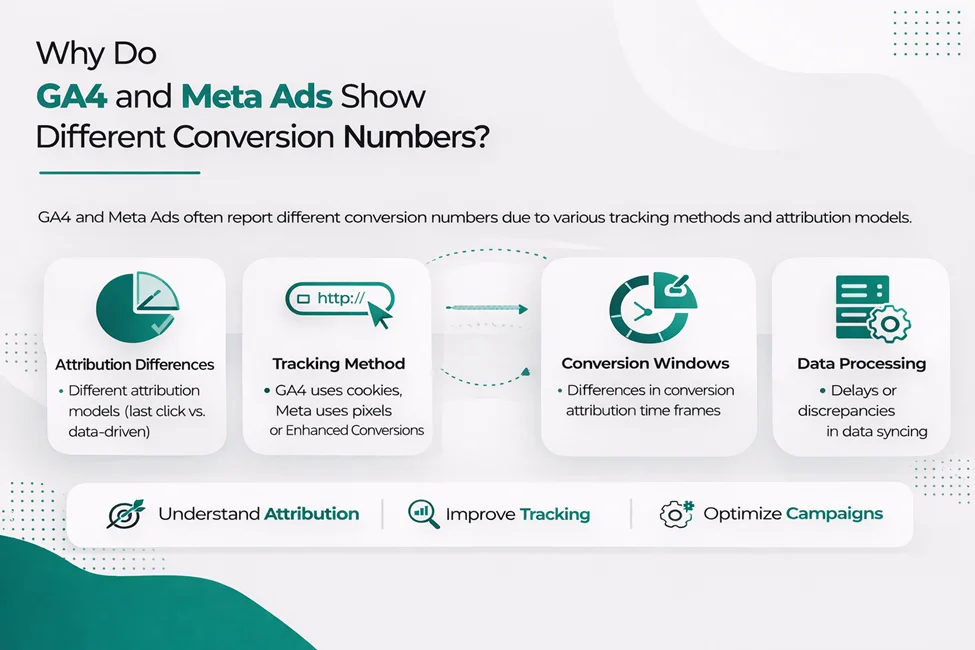
Why Do GA4 and Meta Ads Show Different Conversion Numbers?
Why Don’t GA4 and Meta Ads Match?
Nearly every marketer sees this. Meta Ads Manager shows 100 sales. GA4 shows only 60 to “Facebook / Paid.”
This comes from attribution window differences. Meta defaults to 7-day click and 1-day view. It takes credit if users buy within a week of clicking.
GA4 often uses “Last Non-Direct Click.”
View-through vs click attribution plays a big role too. Meta counts conversions from users who saw ads but did not click. GA4 only tracks clickers.
What Is the Difference Between Analytics vs Ad Platform Data?
The two platforms report differently.
Meta is “Self-Attributing.” It only looks at its own performance.
GA4 is “Neutral.” It looks at the whole journey. All channels. Search. Email. Social.
Say a user clicks a Meta ad. Later clicks a Google Search ad. Then buys. Meta claims the conversion. GA4 likely attributes it to Google Search.
Understanding these differences helps you read ads analytics integration reports right.
How Much Data Difference Is Normal?
In the UK, 15% to 25% discrepancy is typical. If Meta reports more than GA4 within this range, it is usually just different attribution models.
But if the gap exceeds 40%, there is a technical problem. This might be broken UTM parameters. Or misconfigured Meta GA4 integration. Or cookie consent banner blocking too much traffic.
How Do You Troubleshoot Meta GA4 Integration?
Why Aren’t Events Showing in Meta?
If GA4 events are not in Meta Events Manager, check if they are inactive in GA4. Meta only pulls events triggered in the last 24–48 hours.
Check “Key Events” settings in GA4. Make sure they are marked.
If events fire in GA4 but not in Meta, check mapping settings. Look for typos in event names.
What Causes Event Mapping Errors?
Mismatched events are common. Say you map GA4 “pageview” to Meta “Purchase.” Your ad optimization becomes chaos. Meta tries finding people who just view pages. Not buyers.
Ensure every mapping makes sense. Do not miss key events.
If Meta reports “Mapping Error,” the data stream likely misses a required parameter. Like value or currency.
Why Is Connection Quality Low?
“Low Connection Quality” in Events Manager means insufficient event signals. This happens when you do not send enough metadata. Email, city, zip code. This helps Meta match visitors to users.
To fix this, enhance your ga4 first party data setup. Capture more hashed user identifiers. Ensure they pass through integration.
What Causes Conversion Tracking Problems?
Duplicate events happen when the same conversion is sent via Pixel and GA4 integration. Without a shared event_id for deduplication. Your ROAS looks twice as good. Until you check your bank.
Other issues include missing UTM parameters. GA4 cannot identify Meta traffic. Incorrect event firing is another. Tags trigger on wrong pages. Like “Lead” event firing on the form page. Not the “Thank You” page.
What Tools Can You Use for Debugging GA4 and Meta?
Your main tools are GA4 Debug View. It shows event timelines. Use the Meta Test Events tool too.
Use your browser developer tools. Use the Network tab. This shows payloads sent to Google and Meta.
If you see 404 or 500 errors on tracking requests, the issue is server or script level.
What Are Common Misconceptions About Meta GA4 Integration?
Should GA4 and Meta Conversions Match Exactly?
This is the biggest myth in digital marketing. Because of attribution windows and “walled gardens,” they will never match exactly.
The goal of meta integration with ga4 is not to reconcile every penny. It gives Meta enough behavioral data to optimize delivery.
For a single source of truth, rely on your internal CRM. Or backend sales data.
Is UTM Tracking Alone Enough?
UTMs matter for reporting. But they are passive. They tell you what happened. They do not tell Meta’s algorithm what happened.
Without technical GA4 Meta integration, Meta cannot use GA4 insights to improve targeting. You need the API connection. This feeds machine learning models driving modern ad performance.
Does GA4 Integration Automatically Improve Ad Performance?
Integration is required for success. But not a guarantee.
Integration improves your ad potential by providing better data. You still need quality creative. A compelling offer. A website that converts.
Think of integration as high-octane fuel. It will not help if the engine is broken.
How Can A8OM Help with Meta GA4 Integration?
Implementing professional ads analytics integration is complex. It needs expertise in web development. Data science. Privacy law.
A8OM is a leading meta ga4 setup agency UK. We specialize in helping businesses build accurate tracking systems. Future-proof systems.
End-to-End Tracking Setup
We handle everything. The entire process. Initial GA4 property configuration. Complex Meta Ads integration. Every technical detail.
We ensure your ads conversion tracking setup is perfect. It captures every valuable interaction. Every conversion. Every micro-conversion.
Advanced Event Mapping
We do not use default settings. We build custom analytics event architectures. Tailored to your business goals.
You might need to track complex multi-step leads. Long sales cycles. Or high-volume e-commerce transactions. Our analytics event mapping ensures Meta gets the exact signals that matter.
Server-Side Tracking Implementation
To fight data loss from ad blockers and privacy updates, we deploy server side tracking setup. Professional implementation. Via Google Tag Manager and Meta Conversions API.
Your data stays accurate. Stays complete. Your ad performance stays stable in a cookieless world.
Privacy-Compliant Tracking
We take meta ga4 cookie compliance uk seriously. Very seriously.
We integrate your tracking with your cookie banner. Your CMP. We implement Consent Mode V2. Your data collection is fully GDPR-compliant. You do not sacrifice too much measurement data. You balance privacy and performance.
Ongoing Tracking Optimization
Data tracking is not “set and forget.” We provide ongoing debugging. Regular debugging. Troubleshooting. Quick fixes. Reporting insights.
Your ga4 meta ads integration keeps delivering high ROI. Strong ROI. As platforms and laws evolve. Contact our team to learn more about our tracking and analytics services.
Frequently Asked Questions
Connecting Meta Ads with GA4 in the UK follows standard steps. But requires extra attention to UK GDPR. To Consent Mode V2.
Start in Meta Events Manager under “Partner Integrations.” After selecting Google Analytics, authenticate your Google account. Select the relevant GA4 property.
This confuses marketers most. Meta and GA4 use different attribution models.
Meta typically uses “7-day click, 1-day view.” It claims credit if users buy within seven days of clicking. Or one day of seeing an ad.
GA4 defaults to “Data-Driven” or “Last Non-Direct Click.” This often credits the final source. Like Organic Search or Direct.
Prioritize events representing significant funnel steps.
When you map these in Meta Events Manager, ensure “Event Value” and “Currency” parameters pass correctly.
Mapping micro-conversions like scroll depth or video view helps too. For building “warm” retargeting audiences. But avoid mapping too many low-intent events as conversion goals. This confuses Meta’s algorithm. It finds users who “browse.” Not users who “buy.”
If GA4 events are not appearing in Meta, the issue lies in one of three areas. Configuration. Consent. Latency.
First, check GA4 Debug View. Make sure events fire on your website. If GA4 is not seeing them, Meta will not either.
Second, verify your meta ga4 cookie compliance UK settings. If your cookie banner is too restrictive, tags may be blocked. Or Consent Mode is not set up.
Basic browser-side integration is possible. But server-side tracking is highly recommended. For any business spending over £2,000 per month on ads.
Browser-side tracking is increasingly unreliable. Ad-blockers cause this. Safari’s Intelligent Tracking Prevention (ITP) causes this. Third-party cookie decline causes this.
Yes, it can be. But it depends entirely on your implementation. The integration itself is a tool. How you handle data determines legality.
Working with a meta ga4 setup agency UK like A8OM ensures your tracking architecture is “privacy by design.” This protects your business from potential ICO fines.
For UK and EU businesses, “Advanced Consent Mode” is the gold standard.
Configure your GTM tags to fire based on analytics storage and ad storage variables. When a user accepts cookies, these variables are set to “granted.” This allows full tracking.
If they decline, Google and Meta can still receive “pings.” These do not contain cookies. This allows basic measurement and behavioral modeling. Without violating privacy.
Basic setup can be completed in a few hours. For someone familiar with Meta Events Manager and GA4.
However, professional-grade setup takes longer. This includes analytics event mapping. Server side tracking setup. Consent mode integration. It typically takes 5 to 10 working days. This includes testing and validation.
Cost varies. It depends on your website complexity. On your data volume.
For a small business using standard Shopify or WordPress plugins, “tool cost” might be zero. But the opportunity cost of incorrect setup is high.
Professional implementation from a meta ga4 setup agency UK typically ranges from £1,500 to £5,000. For a one-time comprehensive setup and audit. This investment usually pays for itself within three months. Through improved ad targeting and reduced data loss.
You cannot directly “export” a GA4 audience list into Meta as a CSV in one click.
But the integration lets Meta build audiences based on GA4 events it receives. For example, you might send purchase events from GA4 to Meta. You can create a Custom Audience in Meta Ads Manager. “People who triggered the Purchase event via GA4 integration.”
Conclusion
The integration of Meta Ads and Google Analytics 4 represents the future. The future of data-driven advertising. Digital advertising.
For UK businesses, it is the most effective way to overcome fragmented tracking challenges. The challenge of siloed data. Privacy-related data loss challenges. The challenges of iOS 14. The challenges of GDPR. The challenges of cookie deprecation.
By following a structured approach to ads conversion tracking setup and analytics event mapping, you ensure your advertising budget is optimized. Spent wisely. Based on real-world behavior. Actual user actions. Not guesswork. Not assumptions.
As we have explored, successful GA4 Meta integration requires more than button clicks. More than a simple setup. It requires a deep understanding of data flow. How data moves. Server-side architecture. The technical foundation. UK compliance. GDPR requirements. Privacy laws. Consent management.
Whether you implement this yourself or partner with a specialist digital marketing agency, the most important step is to start now. Do not wait. Do not delay.
The sooner you start, the sooner you benefit. The sooner you see the results. Better ROAS. Better targeting. Better data. Better decisions. Learn more about our comprehensive digital marketing services including SEO and social media marketing to support your overall marketing strategy.