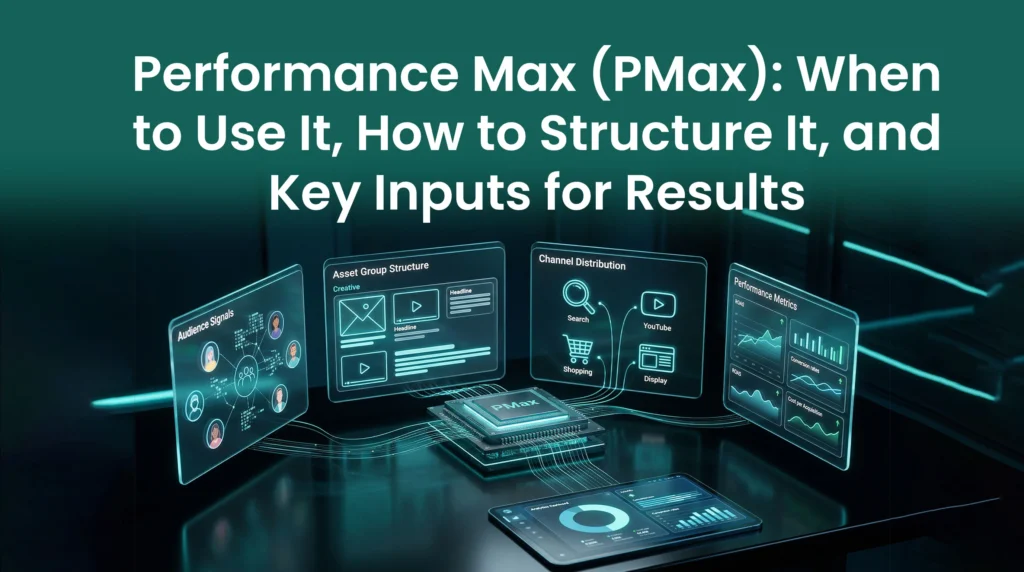
Google Ads has shifted. Automation now drives most campaign decisions. Performance Max sits at the center of that shift.
This campaign type runs ads across every Google platform. It uses smart technology to find buyers for your business. In this guide, you will learn how to use it well.
What Is Performance Max (PMax) in Google Ads
Performance Max is a goal-based campaign type. It runs ads across Search, YouTube, Display, Discover, Gmail, and Maps, all from one place.
At its core, PMax is automated. You set your goals and upload your assets. Google handles where and when your ads appear.
The system targets users who are most likely to convert. It uses real-time data and behaviour patterns to do this. You spend less time managing and more time reviewing results.
Instead of chasing clicks, PMax focuses on real actions. These include leads, purchases, and sign-ups. That makes it one of the most powerful tools in Google Ads today.
How Performance Max Works
A PMax campaign runs on Google’s machine learning engine. It reads large amounts of data in real time. Then it decides where your ads should appear.
The system looks at key signals:
- User location
- Time of day
- Device type
- Search behaviour
- Purchase intent
Based on these signals, it predicts who will convert. Then it adjusts your campaign without manual input.
Smart Bidding
Google sets bids in real time. It aims to maximize conversions within your set budget.
Asset Combination
Your headlines, images, and videos are tested in different combos. The best-performing versions get shown more often.
Cross-Channel Delivery
Ads run across Search, YouTube, Display, Discover, and Gmail. No manual setup needed.
Audience Signals
You give hints about your ideal customer. The system then finds more users like them.
You do not control keywords or placements directly. Instead, you guide the system with goals and data. Over time, the algorithm learns to deliver better results.
When to Use Performance Max (Decision Framework)
Knowing when to use PMax can protect your budget. It is not the right fit for every situation.
Use it when you have clear conversion goals and solid tracking. It works best when you want reach across multiple channels.
| Scenario | Use PMax? | Reason |
| Clear sales goals | Yes | AI targets these outcomes directly. |
| Budget over £50/day | Yes | The AI needs enough data to learn. |
| Need for high reach | Yes | Covers all Google platforms at once. |
| Strict keyword control | No | PMax does not allow exact targeting. |
| Very small budget | No | Learning phase may waste your spend. |
PMax is ideal for growing your brand across channels. If you already run a successful Search campaign, add PMax to it. It finds traffic pockets that Search campaigns often miss.
Do not use PMax if your conversion tracking is not set up properly.
Performance Max Campaign Structure
A performance max campaign does not use traditional ad groups like older versions. Instead, it uses something called Asset Groups to organize your creative work. An asset group is a collection of creative materials focused on one theme. This helps Google understand what you are trying to sell to people.
Asset Groups
Think of asset groups like a folder for your specific ads. You put your headlines, descriptions, images, and videos into this digital folder. Google then pulls from this folder to build ads for different users. This is how you generate performance max ad examples for various platforms.
Audience Signals
You must provide pmax audience signals to the system during setup. These signals tell Google who your ideal customer is right now. You can use your own email lists or your website visitors for this. You can also target people who search for specific terms on Google.
Key Logic
Keep your structure simple to help the AI learn faster. Do not create too many asset groups when you first start. Group your products by their performance or their main category. This allows the budget to flow to the items that sell best.
PMax Campaign Setup (Step-by-Step)
Setting up a campaign requires careful planning and very precise execution. Follow these steps for a successful pmax campaign setup in the UK on your account.
- Select Your Goal: Choose Sales, Leads, or Local store visits as your target.
- Choose Campaign Type: Select Performance Max from the main campaign menu.
- Set Your Budget: Pick a daily amount you can afford for six weeks.
- Bidding Strategy: Start with Maximize Conversions for all new accounts.
- Location and Language: Target the UK and choose the English language.
- Build Your Asset Group: Add at least 15 images and 5 high-quality videos.
- Add Audience Signals: Upload your customer lists for much better targeting.
- Setup Tracking: Complete the pmax conversion tracking setup before you launch.
Tracking is not optional. Without it, the AI cannot learn what works. Make sure your Thank You pages carry the correct Google tags. Use Google Tag Manager to simplify the process. Double-check your tracking before the campaign goes live.
Key Inputs for PMax Results
Your results depend on what you put in. Bad inputs lead to poor performance. Focus on these three tiers.
Tier 1: Critical Inputs
- Conversion data is the most important input. The AI needs real sales data to understand your buyers.
- High-quality creative drives clicks. Weak images and copy reduce performance fast.
- A strong budget is essential. The AI needs room to test and learn.
Tier 2: Performance Drivers
- Audience signals help Google find buyers faster. They reduce guessing early in the campaign.
- First-party data from your CRM is a major advantage. Upload it and let Google use it.
- Search themes describe your business to the AI. They give Google useful context.
- URL expansion lets Google find your best landing pages on its own.
Tier 3: Supporting Inputs
- Ad extensions add more detail to your ads. Include phone numbers, prices, and site links.
- Customer Match helps Google find users like your current buyers.
- Account-level negative keywords block bad traffic before it wastes budget.
Strong inputs save money. Quality images improve click-through rates. Accurate conversion data improves bidding. These inputs are the fuel that drives your campaign forward.
Performance Max Best Practices
Follow these practices to get the most from PMax. They come from managing real UK accounts over many years.
- Refresh Your Assets: Update images and videos every few months.
- Use Video: Campaigns with video outperform those without it.
- Exclude Your Brand: Stop PMax from bidding on your own brand terms.
- Test URL Expansion: Watch which pages Google sends traffic to.
- Be Patient: Wait six weeks before making major changes.
- Monitor Lead Quality: Use Enhanced Conversions to track real sales.
Avoid making frequent changes during the learning phase. Every budget change resets the AI’s learning. Consistency is what drives long-term results with automation.
Performance Max vs Other Campaigns
PMax is different from other Google Ads campaign types. Here is how it compares:
| Feature | Performance Max | Search Campaign | Standard Shopping |
|---|---|---|---|
| Placements | All Google Channels | Search Only | Search and Shopping |
| Targeting | AI and Audience Signals | Keywords | Product Feeds |
| Control | Low (Automated) | High (Manual) | Medium |
| Setup Speed | Fast | Slow | Medium |
PMax offers much wider reach than Standard Shopping. Standard Shopping only shows on the Shopping tab and Search results. PMax extends those same products to YouTube and the Display network. However, Standard Shopping gives more control over individual bids.
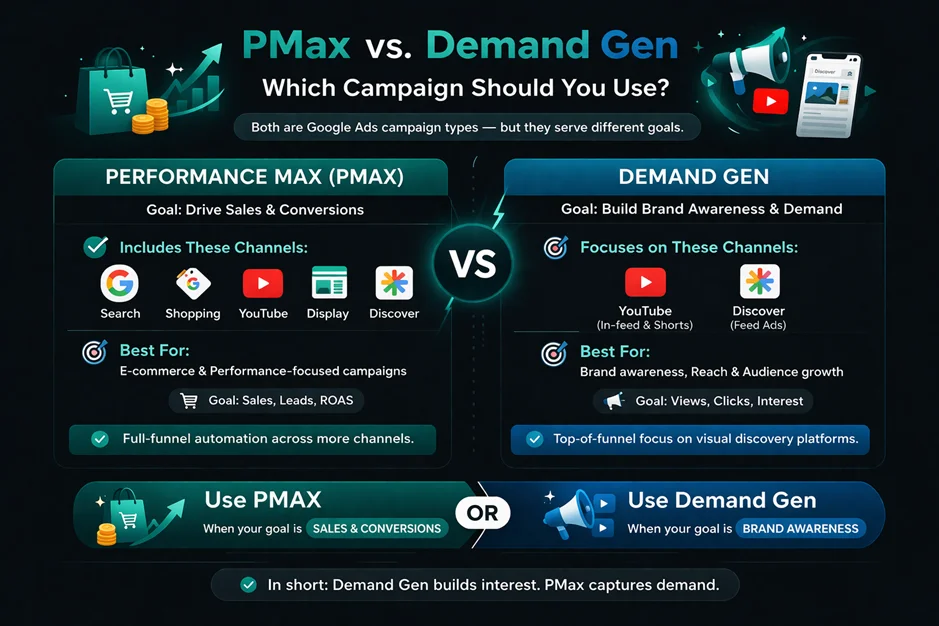
PMax versus Demand Gen is a common question. Demand Gen focuses on YouTube and the Discovery feed. PMax includes those channels but adds Search and Shopping too. Use PMax for sales. Use Demand Gen for brand awareness.
Performance Max Cost and ROI
Budgeting for PMax requires a clear plan. The system can be highly cost-efficient when set up correctly. Because it uses AI, it often finds cheaper clicks on Display. This can lower your cost per acquisition over time.
A good starting rule: spend 10 times your target cost per lead. If you want a lead for £10, set a daily budget of £100. This gives the AI enough data to optimize spending. Lower budgets may cause the campaign to stall.
Performance Max Timeline
Results do not come instantly. PMax follows a clear and predictable pattern. Understanding this helps you stay patient during the early phase.
- Week 1-2: Learning Phase. Google is testing your ads and audiences.
- Week 3-4: Optimization. The AI begins to Favor the best creative assets.
- Week 5-6: Stability. Performance should become more predictable and steadier.
- Week 8+: Scaling. This is when you can safely increase your budget.
Do not judge the campaign in the first 14 days. The system is still collecting behavior data. Stopping too early wastes your initial spend. Give the machine time to find your best customers.
Common PMax Problems and Solutions
Many advertisers hit the same issues when starting with PMax. Here are the most common ones and how to fix them.
Spending but no conversions
Cause: Conversion tracking is broken or budget is too low.
Solution: Check your tracking setup and increase the daily budget.
Low-quality leads
Cause: Google is picking up spam traffic from Display placements.
Solution: Use Qualified Lead conversion goals or upload your customer lists.
High cost per click
Cause: You are competing in a high-cost keyword space.
Solution: Strengthen your ad creative and use better images.
No control over ad placements
Cause: This is standard with all PMax campaigns.
Solution: Use Placement Exclusions to block low-quality websites.
Search traffic cannibalization
Cause: PMax is taking clicks from your existing Search campaigns.
Solution: Set Search ads to Exact Match keywords only.
Limitations of Performance Max
PMax is powerful, but it has real limitations worth knowing.
- Limited visibility: You cannot see exact search terms. This makes optimization harder to do with precision.
- Reduced control: You cannot manage placements directly. Ads may not always appear where you expect.
- Restricted reporting: You see overall results, but not always clear channel-level breakdowns.
- Data dependency: PMax works best with strong conversion data. Without it, results can be inconsistent.
Knowing these limits helps you set realistic expectations. It also helps you plan other campaigns to fill the gaps.
Advanced Strategies
Once your campaign is stable, try these next-level approaches.
Segmentation
Do not put all products in one campaign. Create separate campaigns for high-margin and low-margin items. Set different ROI targets for each group. This keeps your spend focused on the most profitable products.
First-Party Data
Use your CRM data to build custom audience segments. Upload lists of your big spenders or repeat customers. Tell Google to find more people who match those profiles. This helps the AI skip the slow learning phase.
New Customer Acquisition
You can set PMax to bid only on new customers. This stops you from paying for clicks from existing buyers. It is a smart way to grow your audience and reach fresh leads.
How We Help You Get Better Results from Performance Max
Running performance max without a clear plan often leads to wasted spend. At A8OM, the approach is simple, build campaigns that are structured properly and guided by real data.
Strong Setup from the Start
Every performance max campaign is set up with clear segmentation and aligned assets. This avoids confusion later and gives the campaign a solid base to work from.
Focus on Data That Matters
Better results come from better data. With the right pmax conversion tracking setup and improved audience signals, targeting becomes more accurate and efficient.
Continuous Improvement
Campaigns are not left running on autopilot. Through active pmax campaign management, performance is reviewed, tested, and adjusted over time to improve outcomes.
Conclusion
Performance Max gives advertisers access to all Google channels in one place. It uses real-time AI to find users most likely to convert. When set up well, it can scale results beyond what manual campaigns achieve.
Focus on your inputs. Give the campaign time to learn. Use the right structure from day one. The future of Google Ads is automation. Learning to guide it with better data is the real skill. Start there, and the results will follow.
Frequently Asked Questions
Performance max is a campaign type that runs your ads across all Google platforms from one place. Instead of managing each channel separately, you set a goal, and the system works to achieve it. It focuses on actions like leads or sales rather than just clicks.
You should use when to use performance max once your account already has steady conversion data. It works well when you want to scale results across multiple channels. If your data is limited or you need full control, it is better to start with Search campaigns first.
Performance max campaign is not dependent on manual keywords or placements. Instead, it relies on signals and data to determine the placement of ads. Other campaigns provide you with more control, whereas PMax prioritizes automation to emphasize outcomes.
With google pmax, you can reach users across several platforms without creating multiple campaigns. It saves time and helps find new audiences. The system adjusts quickly based on user behavior, which can improve overall performance.
There is no fixed number, but a performance max campaign needs enough budget to generate consistent data. Without regular conversions, the system cannot learn properly. Start with a stable budget, then increase it once results improve.
Begin by selecting your campaign goal, then set your budget and bidding strategy. Add your assets and define audience signals. A proper pmax campaign setup in the UK also requires correct tracking and compliance with local data rules.
The success of any campaign depends on key inputs for pmax results. This includes accurate tracking, strong landing pages, clear audience signals, and quality creative assets. Weak inputs often lead to poor results.
Yes, pmax advertising can improve ROI when the setup is done correctly. It focuses on users who are more likely to convert. However, results depend on the quality of your data and how well the campaign is structured.
You need proper tracking in place. A strong pmax conversion tracking setup allows you to measure conversions, cost per action, and return on ad spend. It is better to review trends over time instead of daily changes.
It can work, but only if there is enough data. Google pmax may struggle in accounts with low traffic or few conversions. In those cases, starting with simpler campaigns often delivers better early results.
Businesses with very limited data or tight control requirements may find performance max campaign difficult to manage. It performs best when there is enough data for the system to learn and adjust.
With performance max, bidding is automated. The system adjusts bids in real time based on the likelihood of conversion. This removes manual control but relies heavily on accurate data.
The performance max cost comparison is based on results such as CPA or ROAS rather than fixed click costs. Spending varies depending on competition, targeting, and data quality.
A performance max campaign allows you to run ads across all Google platforms within one campaign. This makes it easier to reach users at different stages without managing separate campaigns.
Many campaigns fail due to weak inputs or poor structure. Ignoring tracking or creative quality can limit performance. Following performance max best practices helps reduce wasted spend and improves results over time.